Troubleshooting audio and reconnection
Most audio problems in a workshop come down to a blocked microphone, a phone too far from the talkers, or a dropped connection. And if the audio is fine but no text appears, that is a fourth, separate cause. Here is how to fix each one fast.
If a table is not being captured, the audio pill is the fastest tell, it turns green (Ljud funkar) only when the phone's audio is confirmed reaching the meeting, and glows with voice. If it sits on the grey Väntar på ljud… state or never appears, the cause is almost always one of three things: the microphone is blocked, the phone is too far from the talkers, or the connection dropped. Work through them in that order.
A quiet table is not a fault: as long as the microphone picks up anything at all, even a silent room's faint background, the pill stays on Ljud funkar, and it never warns while RoomRadar is receiving the table's audio. It only escalates when the microphone gives no signal whatsoever. After about ten seconds of that it turns amber and reads Hör inget ljud just nu (usually the wrong microphone, or one muted in the phone's settings; pick another under the microphone menu). After about two minutes it turns red, reads Ljud verkar inte funka, and a red frame appears around the whole phone screen so it is visible from across the table.
No sound from a table
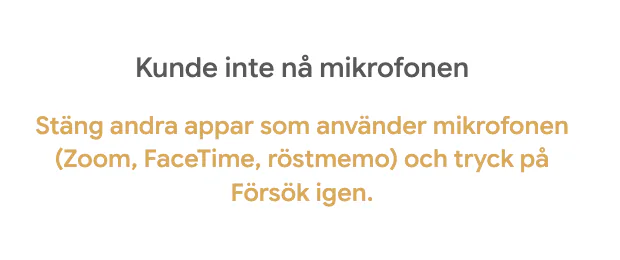
A pill that never turns green usually means the microphone is blocked. Once a phone blocks the mic, reopening the page will not ask again, the permission has to be changed in settings. On iPhone: Settings → Safari → Microphone → Allow. On Android: the browser's Site settings → Microphone → Allow. Then tap Try again on the phone.
Audio is weak or muffled
If the pill glows only faintly, the phone is probably too far from the group or covered up. Move it to the middle of the table, clear of bags and papers, and keep it face up. A quick five-second sound check per table before you start catches most of these, see test audio before a workshop.
The audio works but no text appears
This is a different problem from the ones above, and it looks confusing because everything else seems fine: the pill is green, the meters move, the groups are connected, and the transcript simply does not grow. If it lasts more than about a minute, a red No text is coming through banner appears at the top of the workspace, with the time it started. It means RoomRadar is receiving the audio but the speech-to-text service is not returning anything.
Keep going, do not stop the meeting. The banner disappears on its own the moment text starts arriving again. Check your internet connection first, that is the common cause. If the banner stays up for several minutes with people clearly talking, the transcription service itself is unavailable, and that is worth contacting support about while the session is still running.
Spotting a silent table from the facilitator view
You do not have to walk round the room to find the problem table. Once nobody in a group has been heard for about two minutes, that group turns red everywhere you would look for it: its coloured square in the sidebar becomes a red !, and its row in the overview timeline becomes one long red bar instead of the empty lane it would otherwise be. An empty lane looks the same as a group that simply has not spoken yet, which is why a silent table used to be so easy to miss.
Under the group name you get the duration in plain words, Inget ljud från [gruppnamn] på X min, so you can tell a table that just went quiet from one that has been dead for ten minutes. Hover either the sidebar row or the timeline bar for the full explanation and what to try.
There is one more case, which the phone cannot notice from its own meter: it hears the room, but the sound that actually reaches RoomRadar is complete silence. That group turns red in the same places within about half a minute, with Bara tystnad från [gruppnamn] på X min under its name, and RoomRadar tells the phone, so the table sees the same red Ljud verkar inte funka at the same moment. As soon as text from that table arrives again, the warning goes by itself. The fix is the same: ask the table to close the page and join again.
A phone dropped or disconnected
If a phone loses its connection or someone closes the page, you can bring it back without losing the group. See swap or reconnect a phone for the full recovery.
A short network drop costs no words. While its connection is gone, the phone keeps recording (up to five minutes) and sends the audio as soon as the network is back. Those lines then appear in the transcript where they were said, with a small wifi-off icon under the time: hover it and it says Recorded offline. They count in the analysis like any other line. Lines said after you pressed Stop are left out.
FAQ
The microphone is most likely blocked. Change it in the phone settings (on iPhone: Settings → Safari → Microphone → Allow) and tap Try again.
Move the phone to the middle of the table, face up and clear of clutter, so it can hear the whole group.
Not for a short drop: the phone records while the network is gone (up to five minutes) and sends it when it is back, and those lines are marked Recorded offline in the transcript. For a longer drop, reconnect the phone and the group continues, see the guide on swapping or reconnecting a phone.
The audio is arriving but the speech-to-text service is not returning anything. After about a minute a red "No text is coming through" banner appears to confirm it. Check your internet connection, keep the meeting running, and the banner clears itself as soon as text starts arriving.
Ask that table to disconnect the phone from the meeting and join again, which fixes it in most cases. Everything the group said before the audio stopped is already saved and will still be in the replay.
The phone hears the room, but the audio it sends is pure silence, so nothing from that table can be transcribed. It usually happens after the phone was interrupted (a call, another app taking the microphone). Ask the table to close the page and join again; what the group said before it went silent is saved.
Usually not. That state only appears when the microphone has given no signal at all for about ten seconds, never because a group went quiet, and never while RoomRadar is receiving the table's audio. Check that the right microphone is chosen in the phone's microphone menu; it clears itself as soon as the microphone picks something up.