Reconnect a dropped microphone mid-workshop
Get a table's audio back without losing its transcript: RoomRadar retries a dropped phone automatically, and a spare phone continues the same group by picking that table on the join screen.
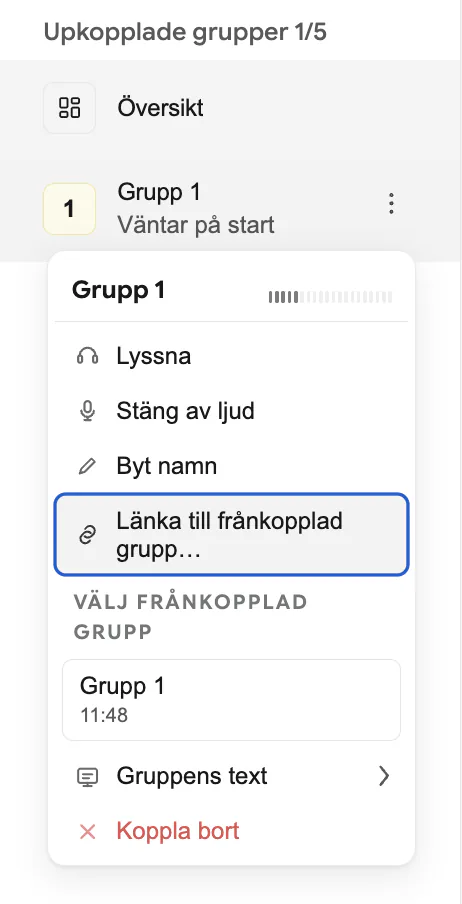
To reconnect a dropped microphone mid-workshop without losing that table's transcript, first give RoomRadar a moment: a phone that drops its connection retries automatically and rejoins its own group. If it does not come back, or the phone itself needs swapping for a spare, scan the code on the spare and pick the same table on the join screen, the row that reads "bortkopplad sedan 10:42". The spare continues that group with its whole history. This guide covers both paths, and the host-side link that still exists for the odd case.
A dropped phone usually recovers on its own
If a phone briefly loses its network connection or the browser tab gets backgrounded, it reconnects automatically, retrying with a short, increasing delay. It rejoins as the same group it left, the table's transcript continues where it left off, with no action needed from you. In the workspace, a group in this state shows no audio and a message that RoomRadar is retrying automatically; give it a few seconds before assuming the table needs help.
When you need to swap in a different phone
Sometimes the original phone will not come back, the battery died, someone closed the tab, or you want to hand the table a fresh device. A group is one phone, and the phone is whichever one picked that table last: the spare does not make a new group, it picks the table's existing one. Every phone that scans the code lands on the same join screen, "Vilken grupp är ni?", listing the workshop's tables; a table whose phone dropped is right there with "bortkopplad sedan 10:42" beside it.
The host-side link, when the phone already joined as something else
If a spare phone typed a new name instead of picking the dropped table, you now have two entries for one table: the old one, disconnected, and a new, empty one. You can fix that from your own screen without walking over. Open the new group's menu in the sidebar and choose Länka till frånkopplad grupp…: RoomRadar lists the groups that dropped and have not reconnected, each with when it was last heard. Pick the table's original group, and the new phone takes over that group's identity, name and running transcript; the empty entry disappears. After the fact, the Grupper page's Slå ihop med… does the same across the whole day.
Retiring a table you are done with
A dropped table keeps its place in the group list, greyed out, with the time it was last heard from. That is deliberate: it is how you notice a table went quiet, and it is what the join screen and the link picker show. The row stays there across a page reload for the rest of the conversation.
When a table really is finished, breaking for lunch, packing up early, or a spare phone you connected by mistake, press Dölj on its row. That removes it from the list and takes it out of the live numbers for the rest of the conversation: it no longer counts in the overview statistics, the per-group word counts or the word cloud, so the remaining tables are compared against each other rather than against a table that stopped talking. The Grupper page shows such a table as "bortkopplad av dig" for that conversation. Everything the table said before it dropped is still recorded and still shows up in the analysis afterward.
Moving a phone to a different table
If a phone sat down at the wrong table, the table fixes it itself: Byt grupp in the phone's footer opens the list of tables and moves the phone for this conversation, and your screen says "En telefon bytte från Bord 1 till Bord 3." with Ångra. If a phone genuinely belongs to another table from some part of the day on, open the workshop's Grupper page (top-right menu, Grupper). A group's row menu has Dela upp, "Från det samtal du väljer blir gruppens telefon en ny grupp", and Slå ihop med… to fold one group's conversations into another. Both can be undone. See see every group across the day.
FAQ
No. Let it reconnect on its own, or pick the same table on a spare phone; either way the group and its transcript continue. Only a spare that typed a new name under Ny grupp leaves the original transcript in a disconnected group, and Länka till frånkopplad grupp… or Slå ihop med… reunites them.
The phone retries with a short, increasing delay for as long as the tab stays open and nobody has left the conversation on it. A phone that is closed or put away will not reconnect on its own; a spare picking its table will.
Have that table reconnect, by reopening the phone's tab or by picking the table on a spare phone. It rejoins the list and the live statistics immediately. Nothing was deleted in the meantime, the hidden table's transcript is still in the analysis afterward either way.
Picking a dropped table on the join screen is meant for continuing one table onto a new device. Merging two different tables' conversations is the Grupper page's Slå ihop med…, which can be undone; use it only when the two really were one table.