Combine several conversations into one analysis
Build one analysis from several conversations: pick the parts of a workshop day, let RoomRadar link the same table across parts (it asks only when it cannot tell), keep the groups you want, and read a series as one story.
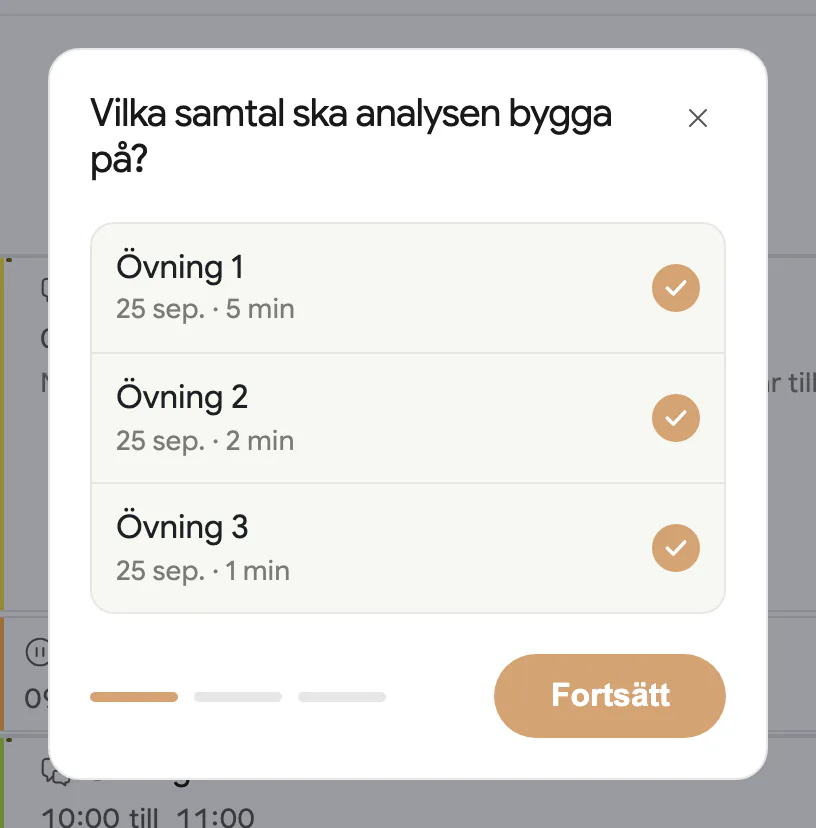
To combine several conversations into one analysis, open the workshop they belong to, press Ny analys in the sidebar, and tick the parts: "Vilka delar ska analysen bygga på?" lists every recorded part of the workshop as a checkbox. RoomRadar reads across all of them together, and a table that took part in several parts is treated as one group throughout, so a series reads as one story instead of three separate rooms.
Pick the parts
A workshop is the container: a day, or several days, of parts. Each recorded part shows its date, group count and length next to its checkbox. Tick one for a single-part analys, or several for the whole day. You can make as many analyser as you like over the same parts; each is its own frozen document, so one per part and one for the day is a normal pattern.
The same table across parts
When the tables' phones join a later part, they see "Välkommen tillbaka!" and "Vilken grupp är ni?" and pick their table from the list, so RoomRadar already knows that Grupp 3 in part two is Grupp 3 from part one. Those links are made at join time and remembered; an analys never asks about them.
Only when there is a gap, a table it cannot match (a phone that joined without picking, a digital group, a recording from before workshops), does the flow ask, once per gap: Är det samma grupper? "Grupperna i Samtal 1 är vilka i Samtal 2?", with the unmatched groups as choices, Ingen per group and Behandla alla separat. Your answer, including "treat separately", is saved with the workshop, so the next analys over the same parts skips the question.
Once linked, two groups are one group for the whole analys: one row in the airtime chart, one entry in the group picker, one voice in the report. Nothing shows them as two tables. The original per-part groups are kept underneath.
Choose the material
The last step, Vad vill du skapa?, ends with one sentence about the material: "Analysen läser samtalens material och workshopens material." That is the default, and for most analyses it is the whole choice: every file on the chosen parts, the notes and files added in the samtal, the workshop's own files, and the workshop's description and plan all ride along as background. If you want less, open Anpassa material under the sentence. It lists the material by samtal, every row ticked, and the workshop under its own tick. Untick what the analys should not read; the sentence then reads "Analysen läser 4 av 6 filer." so you can see the state with the list closed. A file cut by the size cap says so on its row, and a file without readable text (a scanned deck before it was read) is listed greyed and cannot be ticked.
An analys is made once
When you press Skapa analys the analys is generated, and that is its content. There are no versions and no regenerate button: the sidebar shows the group filter under Visar grupper, a pill with what the analys was made from ("2 samtal · 12 filer"; a click opens the Material sheet, which lists it by samtal) and the artifacts. To read a different set of parts or different material, make a new analys with Ny analys; each one is its own thing, and the workshop lists them all. The one exception is a failed generation, whose panel carries Försök igen.
Open a file from the analysis
The Material sheet lists every file the analys read, by samtal and then under Workshopen, three rows per group with Visa +n fler under them. Every file is drawn the same way everywhere in RoomRadar: a glyph for its type, the name, and one line with the size and what it is ("bild, beskriven" for a photo a model read, "förkortad till 12 000 tecken" for a file cut by the size cap). Click a row and the file opens right there: a photo as the picture, a PDF page by page, a Word document as its text with headings and tables, a spreadsheet as its tables, a presentation as its slides, a note as its text. The arrow keys move between the files of the group, and the download glyph gives you the stored copy. Only pictures and PDFs ever open in the browser itself; every other file type is saved to your computer instead. An upload also has to really be the type its name says: a file that is not what it claims is refused as an unsupported file type. The same rows and the same viewer sit behind Anpassa material when you create the analys, so you can look at a file before you decide whether it should be read.
Read fewer groups
An analys reads every table of the parts it was made from (a participant's own opt-outs stay masked). To look at fewer, use the group picker under Visar grupper in the sidebar: a view filter, instant and free, that narrows every surface without changing what was generated. See understand your analysis.
Conversations from different workshops
Ny analys works within one workshop: an analys is made from the parts of the workshop it lives in. A series that runs across several workshops (this spring's against last autumn's) is read one workshop at a time. Older analyses made across workshops still open; home lists them at the bottom under Övriga analyser.
FAQ
Because there was nothing to ask. Tables that picked themselves on the phone's Välkommen tillbaka screen are linked already, and an earlier answer is remembered. The question only appears for a table RoomRadar cannot match.
It merges them for the analys. Their transcripts are read as one continuous discussion, and every part of the analys (stats, themes, the group picker, the report) shows a single group.
The links belong to the workshop: change them on its Grupper page (Slå ihop, Dela upp), then make a new analys. An analys already made keeps the links it was made with.
Yes. Files on the chosen parts, notes and files added in the samtal, and the workshop's own files ride along as background; Anpassa material at creation narrows the list.
The analys reads every table. Afterwards, the group picker under Visar grupper shows only the groups you tick, without regenerating anything.
No. The material is chosen when the analys is created and fixed from then on. Make a new analys with the material you want; the old one stays.
Its compressed copy came out too large to keep, or it was uploaded before RoomRadar kept copies. The analys still read all of it; the viewer shows the text instead of the picture.