Share workshop results as a link
Share workshop results as a link: send a read-only analysis link, or a live shared chat, straight from RoomRadar, no export required.
You do not need to export anything to hand your workshop results to someone else. RoomRadar can share workshop results as a link two ways: a read-only view of the analysis itself, or a live, interactive link to the analysis chat. Both work without the recipient needing an account, and both can be turned off later. You can also invite named people to a whole workshop by their email address, and they find it under Delade med mig when they sign in.
Two buttons at the top right
An analysis has two share buttons at the top right. Bjud in samarbetare shares the whole analysis as one link, and invites people to its workshop. Dela beside it shares what you are looking at: its icon is the open view's own, and its menu holds that view's options.
- Textdokument: Ladda ner som Word (.docx).
- Presentation: Ladda ner som PDF and Ladda ner som PowerPoint (.pptx).
- Sketchnote: Ladda ner som PNG and Ladda ner som JPEG.
- Kort or Dagens kort: Ladda ner som PNG, and Dela… on a device that can share a picture straight to an app.
- Insiktsrapport, Textdokument, Presentation and Sketchnote also offer Länk till den här vyn: the same analysis link, opening on that view.
- Fråga om analysen: Dela opens the chat's own link panel (below).
Share the analysis
Press Bjud in samarbetare to open the sheet of the same name, on an analysis, a samtal or a workshop. At its top right is the link's status: Inte skapad before there is a link, then Delas. Every link, on a workshop, a samtal or an analysis, has Tillståndsnivå with two choices, Läsare and Redigerare. Läsare sees everything the link covers (the generated parts of an analysis, a samtal in every state, a whole workshop), asks the chat about it and downloads it, but changes nothing. Redigerare needs a sign-in: on a workshop it changes the plan and the groups and runs the samtal; on a samtal it runs that samtal (Starta, Pausa, Stoppa, renaming the samtal and its groups, listening to a group, sending to the phones); on an analysis it renames the analysis and adds parts. Someone who opens a Redigerare link signed out only looks. Hold the pointer over a choice to see what it allows. Pick before Skapa länk. Changing a live link from Redigerare to Läsare changes that link at once: the same link, its chat goes on, and anyone who was editing through it can only look from their next step. From Läsare to Redigerare, a small box on that choice asks to make a new link with that role ("The old link stops working, and chats open through it stop too."), and Avbryt leaves the link as it was. A link is never Full åtkomst.
Press Skapa länk at the bottom to create the link, then Kopiera länk beside it to copy it (it says Länk kopierad). Creating and copying are two separate presses. There is one link per analysis, samtal or workshop, so opening the sheet again shows the same link. Links do not expire on their own. The same sheet shares a whole workshop or a single samtal: choose Bjud in samarbetare in the menu at the top of the workshop or the samtal.
What a workshop link shows. The recipient sees the workshop the way you do: the sidebar with its samtal and analyses, Agenda with the day's schedule, and each part's details. They can look at everything and change nothing. Lägg till block, Bjud in samarbetare and Ny analys are still there but disabled, and pointing at one says "Du har läsbehörighet och kan titta men inte ändra." Any samtal opens from the plan or the sidebar: before it starts, its connection screen; while it runs, the live room; once it stops, the recording. The workshop's files open too, including ones added before RoomRadar kept a copy of each file.
What a samtal link shows. The recipient sees the samtal page you see, in every state. Before you press Starta it is the connection screen: Koppla upp grupperna, the code and QR code, and the groups appearing as they join, with "Öppnat samtal" and the samtal's name in the sidebar. While it runs it is the live room, and after you stop it, the recording. Starta, Stoppa and Bjud in samarbetare are there but disabled with the same "Du har läsbehörighet och kan titta men inte ändra."; renaming, removing groups, sending to the groups and the samtal settings are not there at all. Every greyed control says why when you point at it. The sidebar's top row is Agenda, as on your page, but greyed out: the plan is not part of a samtal link, and pointing at it says "Workshopplanen ingår inte i den här länken." A Redigerare on a samtal link has your controls on that samtal: it renames the samtal and its groups, listens to a group, and runs it, never another samtal of the workshop. The link works from the moment you create it, so you can share it before the samtal starts.
Anyone with the link can open it. If they are signed in to a RoomRadar account when they open it, the analysis is automatically saved to their account under "Shared with you", nothing to click, it happens on load. If they are not signed in, they get the option to sign in or create an account first, so the save is not lost.
The link's status. Press the status at the top right and choose: Delas ("Länken är igång"), Pausad ("Inga fler kan tillkomma, existerande är kvar": people who already opened the link still get in, nobody new does) or Stoppad ("Ingen har åtkomst längre": the link stops working at once for everyone who has it, including a samtal or a chat they have open). Choose Delas again to reopen it. People you invited by name are not affected; their access is their own. For a completely new link press Skapa ny länk: a small box on the button asks once ("Den nuvarande länken slutar fungera.") with Avbryt and Skapa ny länk. Then press Kopiera länk to copy the new one.
A link you made before the sheet had Läsare keeps what it had. If you made it without the chat or without downloads, it still has neither, and the sheet says so.
What an analysis link shows. The recipient gets the analysis the way you see it: every part it has, Presentation included, and Fråga om analysen to ask about it. If you never opened the presentation yourself, it is made the first time someone with the link opens it, once, on your account, and then it is there for you too. A Läsare looks at every part and asks the chat, and changes nothing; their questions draw from the link's own limit, like a shared chat. A Redigerare also renames the analysis and adds parts, once signed in.
Which groups the link opens on. A shared analysis always carries every group, and the recipient gets the same group picker you have, so they can look at any table they like. What the link decides is where they *start*: whatever you had selected when you created it. Share while three of six groups are selected and the link opens on those three, with the rest one click away.
Invite people to a workshop by email
The sheet also shows who has access: for example 5 samarbetare with their pictures, and Visa alla opens the list with names, emails and roles. Someone who opened the link signed in is listed by name with "Via länken"; someone who opened it without an account is listed as Anonym with "Via länken", one row per browser, never with a name. You invite by email in the field at the top of the people, Sök eller bjud in med e-post: type the address and press Bjud in. RoomRadar sends no email: the invitation, with the link to the workshop, is copied for you to paste into an email or a message. The person is listed as "Inbjuden" until they sign in to RoomRadar with that address, and the address has to be verified on their account; signing in with another address gives them nothing. Then the workshop is under Delade med mig, at the top of their home page, and it opens as the same workshop page you see. An invitation starts as Läsare: Läsare looks and changes nothing, Redigerare changes the plan and the groups and runs the samtal, Full åtkomst also invites people and shares the workshop.
Each person has a ⋯ menu with their role. For someone who has not signed in yet, Kopiera inbjudan copies the invitation again. Ta bort åtkomst takes the workshop away from them at once, including a samtal or a chat they have open. To change someone's role, pick another role in their menu: it applies at once, and when you take a right away (Redigerare to Läsare, say) their open samtal and chat close and their next load has only the new role.
One person on the link at a time. Everyone who has opened the link has their own ⋯ menu, an anonymous visitor too. Picking a role there changes that person only; the link and everyone else on it keep theirs. On a workshop link, someone signed in who gets a role becomes a named person with it (up to Full åtkomst), with no new link. On a samtal or an analysis link, the role is theirs on that link, Läsare or Redigerare. An anonymous visitor is always Läsare (Redigerare needs a sign-in). Ta bort åtkomst takes the link away from that one person at once: their open page stops, and the link says their access was removed when they load it again. Everyone else keeps the link. To lock everyone out, stop the link or make a new one.
What a Redigerare can do. A Redigerare works on your workshop as you do: adds, moves and removes blocks, renames the workshop and its parts, edits the groups and the sends, adds and removes files, makes analyses, and asks Fråga om workshopen to change the plan. A Redigerare also runs the samtal: opens one from the plan and presses Starta, Pausa and Stoppa on its page, renames and removes groups, and sends to the groups. The samtal runs as yours, in your room, on your plan's limits and your usage, and the workshop's log records who started and stopped it. Everything stays yours and is charged to you. A Redigerare cannot invite anyone, make or remove links, or delete the workshop: Bjud in samarbetare is there but greyed out, and says "Bara ägaren och den med Full åtkomst kan bjuda in och dela workshopen."
What Full åtkomst can do. Everything a Redigerare can, plus sharing: opening Bjud in samarbetare, inviting people (up to Full åtkomst), changing their roles, making, changing and removing links, and removing people. It is given only by name, never by a link. It never deletes the workshop, never touches your billing, and never changes you: you stay the owner, first in the list, and your row cannot be edited. Their own role is yours to change. Your own workshop page picks up their changes within a few seconds, and if you both change the same block at once, the later change wins.
On a samtal's or an analysis' sheet, the email field invites the person to the samtal's or the analysis' workshop: people are invited to a workshop, never to a single samtal.
Share the chat
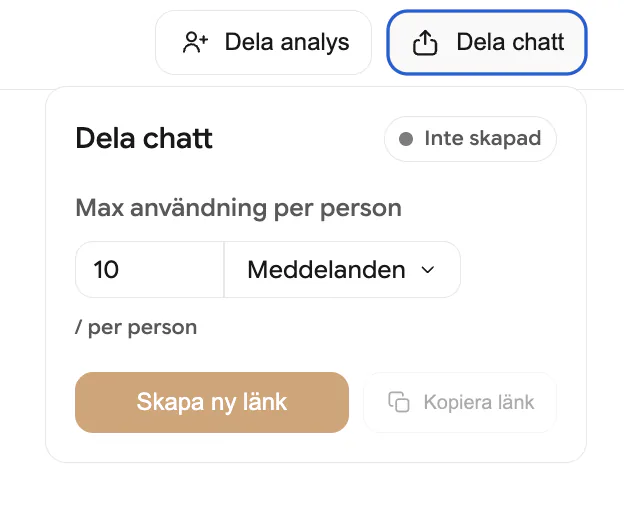
The analysis chat can also be shared on its own, separately from the analysis link: open Fråga om analysen and press Dela at the top right. That is useful when you want people to be able to ask their own questions about the results rather than just read a static view. Anyone with the link can open it and start asking questions without an account. If you would rather everyone signed in first, turn on Require an account for shared chats in Settings under Privacy.
A shared chat link has three states: Shared, meaning the link is live and new people can join; Paused, meaning no one new can join but people already in can keep chatting; and Stopped, meaning no one has access anymore. You control who is on the link individually too, block, unblock, or remove someone, and set a usage cap per person, either as a number of messages or a share of your own monthly usage.
The Dela chatt panel has the same shape as the others: the status and a gear for the settings at the top right, Max användning per person with an amount and a unit, the people with how much each has used of their cap (green, amber, red once it is reached), and Skapa länk and Kopiera länk at the bottom. Skapa ny länk pauses the old chat link, so people already on it stay.
A shared chat is limited to the groups you had selected when you created the link, and that cannot be widened. This is deliberately stricter than the analysis link. An analysis link carries every group and merely opens on your selection; a shared chat can only ever answer from the groups frozen onto it, including when it looks things up in the transcripts. So if a table asked not to be included, or their recording is unusable, select the groups you want first and then create the link, and nothing about the others is reachable through it. Changing your selection afterwards does not change links you already made, create a new link for a different set.
Create and manage a share link
FAQ
No. Both a shared analysis link and a shared chat link open without one. Signing in is only required if you turn on "Require an account for shared chats" in Settings under Privacy.
Two limits. Each person gets their own cap, set on the link, either a number of messages or a share of your monthly usage. On top of that the link itself has a total limit across everyone, set as a share of your monthly usage, so a shared chat can never use more than that no matter how many people open it.
What the link's role says. A Läsare link sees everything it covers, asks the chat about it and downloads it, without an account, and changes nothing. A Redigerare link also edits once they sign in: a workshop's plan and samtal, a samtal's run, an analysis' name and parts.
Yes. Open Visa alla, then that person's ⋯, and choose Ta bort åtkomst. Only that person loses the link, at once; everyone else keeps it. Someone anonymous who clears their browser can come back as a new visitor, so to shut everyone out, stop the link or make a new one.
No, a link keeps the role it was made with, so nobody's access changes behind their back. Pick the other role and the sheet offers a new link with it; the old one stops. To change one person, use their ⋯ instead.
Yes. The link opens the connection screen right away, so the recipient watches the groups join, and then follows the samtal live and into the recording without opening a new link.
The same workshop page you see: the sidebar, Agenda with the schedule, each part's details and files, the samtal that are running or recorded, and the analyses. Every control that would change something is left out or disabled, and says why when they point at it.
No. Bjud in copies the invitation for you to send yourself. The person finds the workshop under Delade med mig when they sign in with the address you invited.
No. Full åtkomst invites people, changes their roles and shares the workshop, but deleting the workshop, your billing and the ownership stay yours. Nobody can give Full åtkomst by link, only by inviting a person by name.
What their role says. A Läsare sees the whole workshop, opens its samtal and analyses, asks the chat and downloads. A Redigerare also changes the plan, the groups, the sends and the files, makes analyses, and starts and stops the samtal, on your workshop and your bill; never invites, shares or deletes. Full åtkomst also invites, changes roles and shares, but never deletes the workshop or touches your billing. They sign in with their own account, so there is no link to forward, and Ta bort åtkomst ends it at once.
So that a forwarded link cannot change your workshop anonymously. Without signing in, the link only lets people look; after signing in, the changes they make are recorded under their account.
Yes. A Redigerare opens the samtal from the plan and presses Starta on its page, as you would. It runs as your samtal, on your plan and your usage, and your own workshop page shows it running within a few seconds. A Läsare sees Starta and Stoppa disabled.
Yes. Your workshop page picks up their changes within a few seconds, without a reload, and each change is recorded under the account that made it.
The whole analysis, the same link Skapa länk makes, with the view you had open as its starting point. The recipient can switch to every other part from there.
No, the analysis has to be generated first. The share panel tells you to generate it before sharing.
Open Bjud in samarbetare on the workshop, press Visa alla, and pick Redigerare in the person's ⋯ menu. They need to have opened the link signed in to be listed by name. No new link is needed, and they can edit on their next load.
Pausad lets in the people who already opened the link and nobody new. Stoppad lets nobody in through the link, and people who have it open are shut out at once. Both are undone by choosing Delas.
The link stops working straight away, and it also disappears from "Shared with you" for anyone who had it. People you invited by name keep their access.